Safety Monitoring for Clinical Trials
Streamline your medical safety review
Connect your EDC data. Instantly visualize safety signals across all domains. Compare exports to see what changed. Generate AI-powered patient narratives. Zero data storage.
Free Windows desktop application – no account required. Works with Medidata Rave, Oracle, Veeva, and any EDC that exports CSV.
Built for safety teams at
Purpose-built for medical safety review
12 interactive dashboards covering the complete safety monitoring workflow – from demographics to disposition, plus incremental review
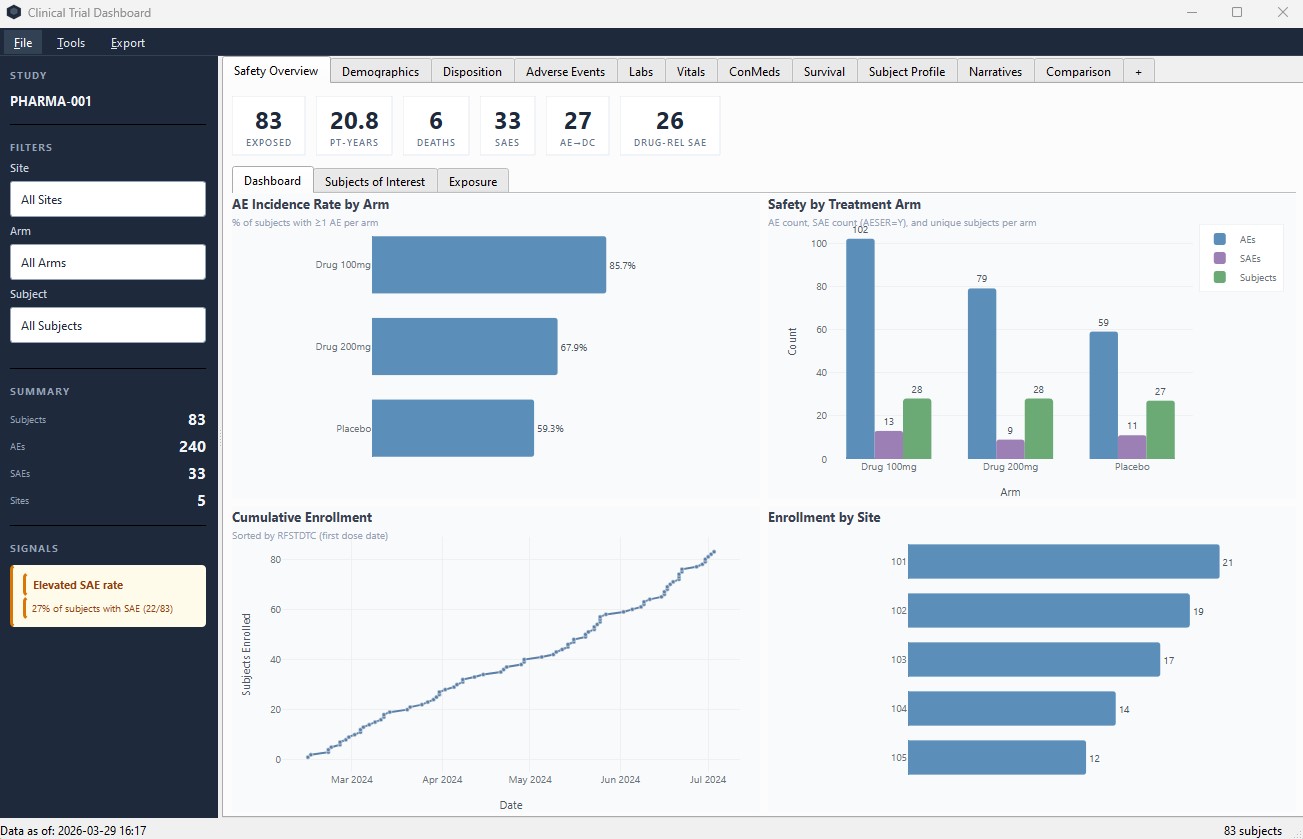
Safety Overview
KPIs, incidence rates, enrollment curves, and treatment arm comparisons at a glance.
Adverse Events
SAE review, forest plots, exposure-adjusted rates, and MedDRA drill-down from body system to individual preferred terms. Chart subtitles explain active filters.
Labs & Vitals
Shift plots, trend charts, hepatotoxicity screening, toxicity grading, and out-of-range flagging.
Subject Profile
Per-subject deep dive across all domains. AE timeline, lab history, vitals, medical history, and notes.
AI Patient Narratives
Generate clinical safety narratives, lab summaries, and AE analyses per subject using AI. Review and edit before use.
Export & Reporting
PowerPoint, PDF, DSMB packages, and ICH E2F-aligned DSUR draft reports as Word documents. Professional formatting with charts, tables, and confidentiality labels.
Custom Builder
Create your own charts. Pick any domain, any columns, apply filters and aggregations. Build the view you need.
Signal Detection
Automated safety signal alerts. Hy's Law screening, site-level disproportionality, dose-response patterns, and more.
Incremental Review
Dedicated Comparison tab lets you load a previous export and instantly see new and modified records per domain – no color conflicts with clinical highlighting.
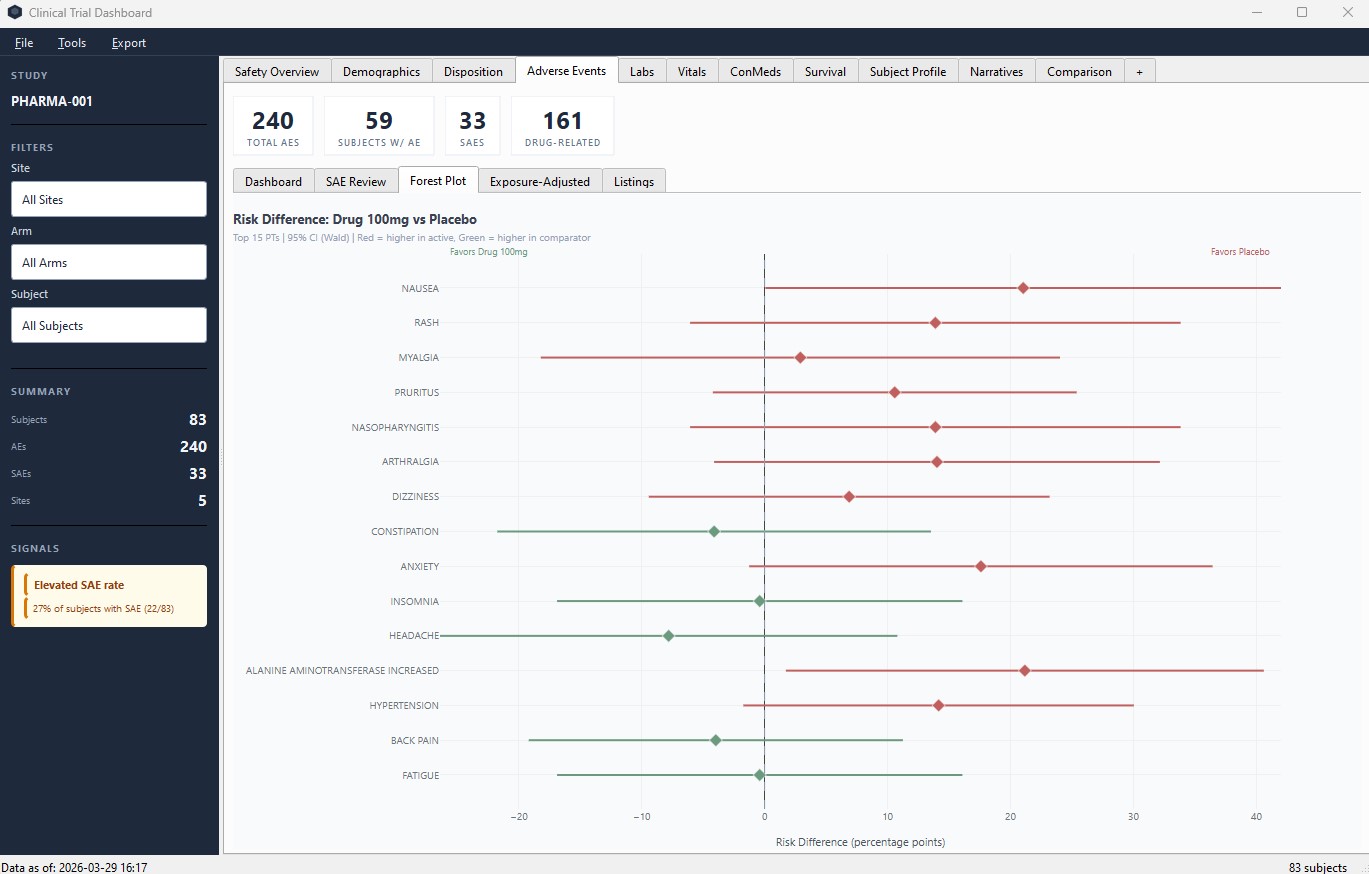
Adverse Events – forest plots with risk difference and 95% CI by preferred term
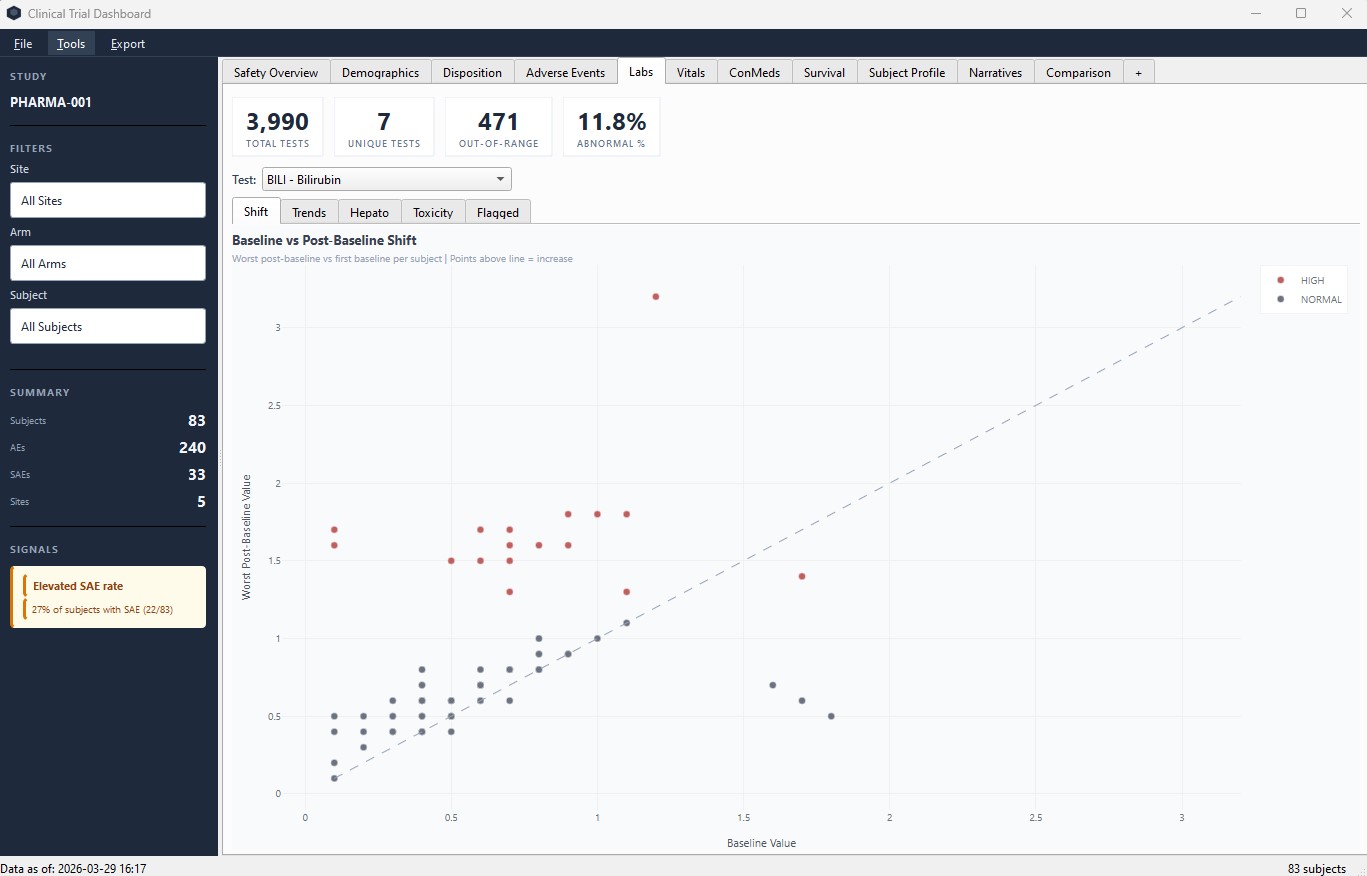
Labs – baseline vs post-baseline shift plots with out-of-range flagging
How teams use CTDashboard
DSMB Meeting Preparation
Generate complete DSMB presentation packages in minutes. Safety overview, AE summaries, lab shift tables, and Kaplan-Meier curves – all formatted and ready to present.
Weekly Safety Review
Load your latest EDC extract, open the Comparison tab, point to last week's export, and instantly see new AEs, changed records, and emerging signals.
Signal Investigation
When a signal appears, drill down immediately. Filter by site, arm, or severity. Cross-reference AEs with labs and conmeds. Export the evidence for your safety report.
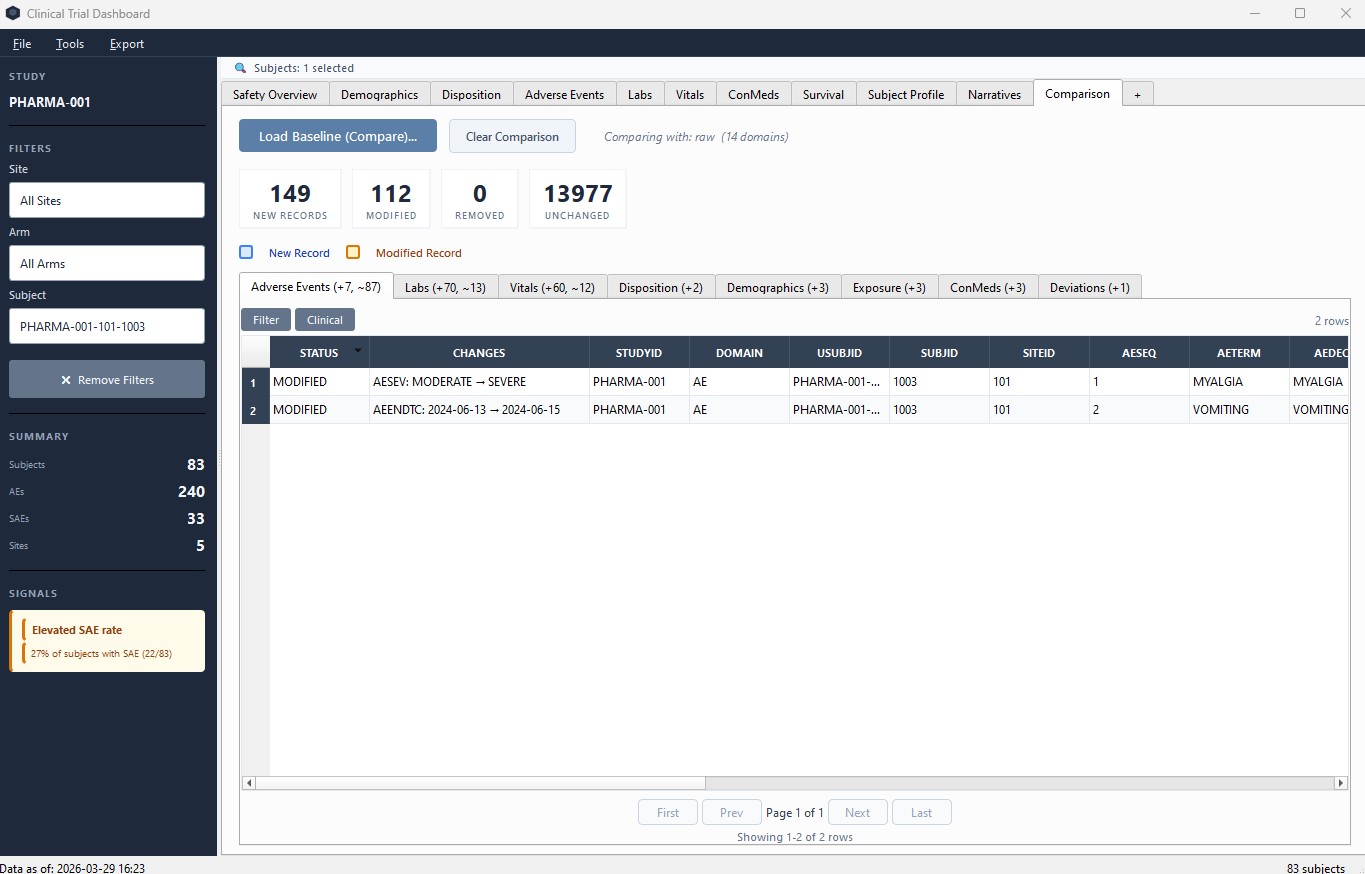
Comparison tab – load a previous export and see exactly what changed per domain
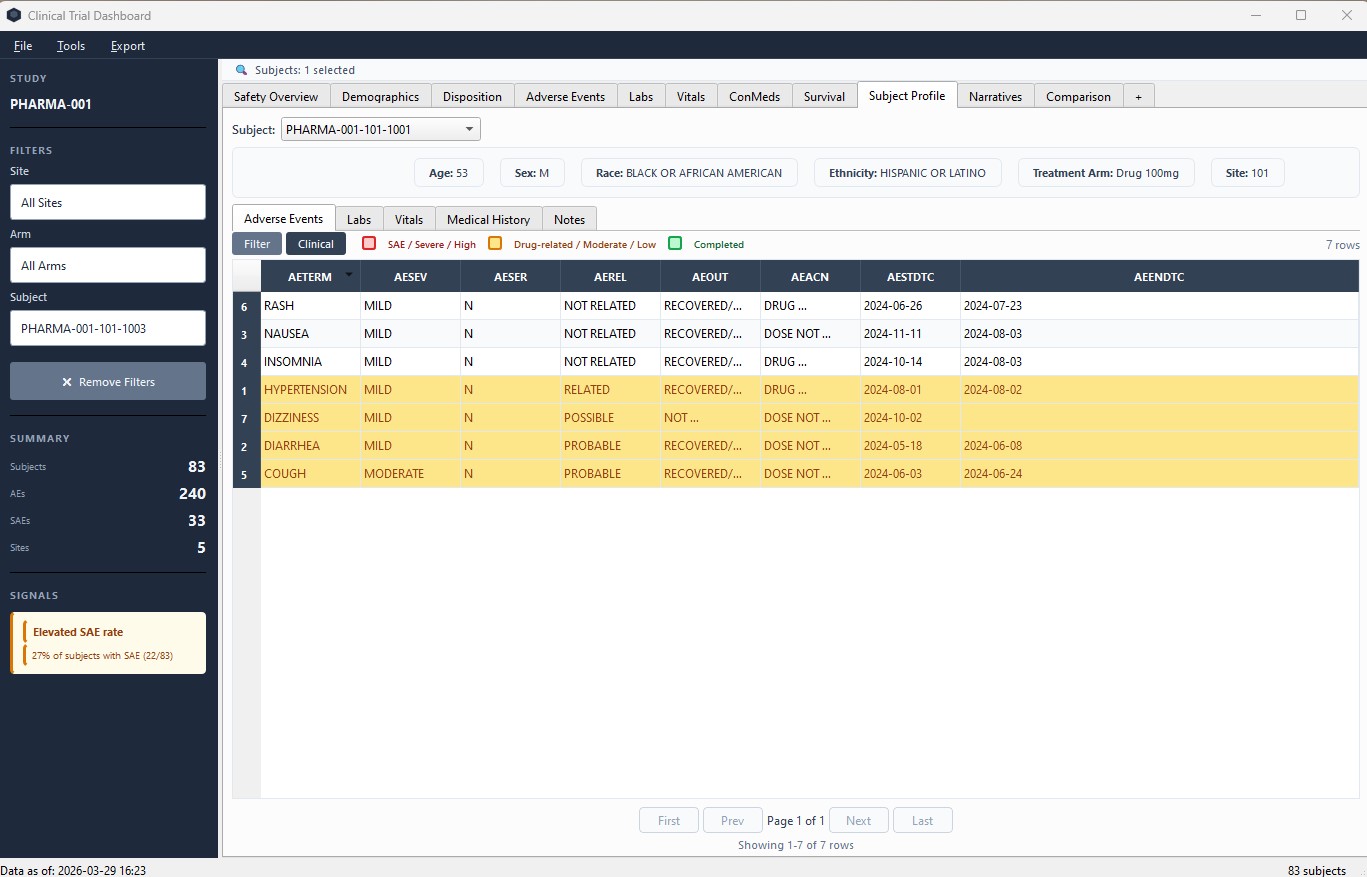
Subject Profile – complete safety view across all domains for a single subject
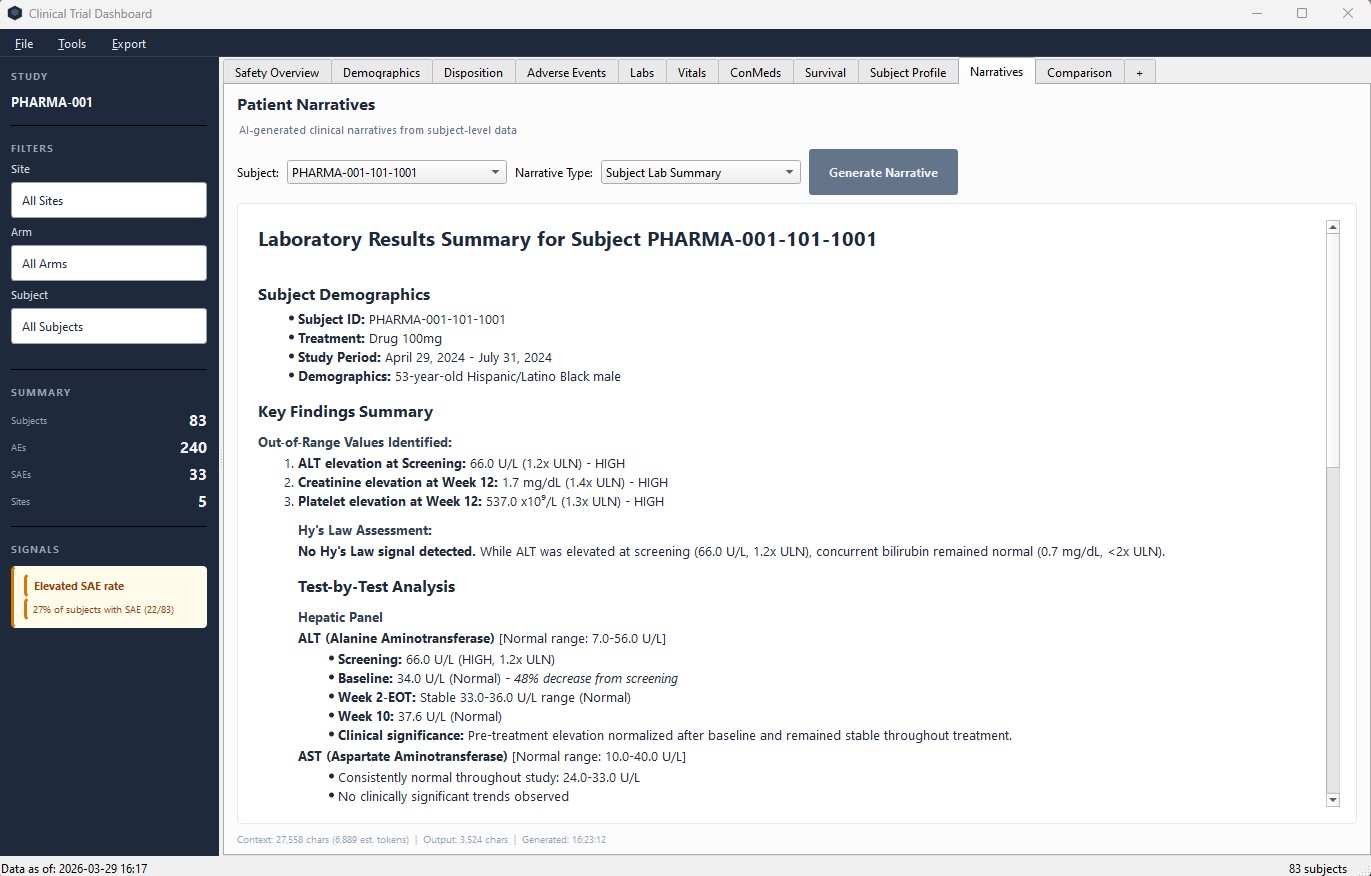
AI Patient Narratives – AI generates clinical lab summaries you can review and refine
How a Phase 2 biotech team uses CTDashboard
A 35-person biotech running a randomized, placebo-controlled Phase 2 study (200 subjects, 8 sites) replaced their manual Excel-based safety review workflow with CTDashboard. Their team includes a part-time medical monitor, a safety physician, and a biostatistician – none with SAS programming experience.
4 hours → 20 min
DSMB package preparation time
Weekly
Safety review cadence (was biweekly)
3 signals
Caught by automated detection before manual review
"We went from spending half a day preparing DSMB slides to having them ready in 20 minutes. The incremental review feature changed how our medical monitor works – she now reviews weekly instead of biweekly because the tool shows exactly what changed."
– VP Clinical Operations, US biotech (Phase 2 oncology)
Privacy-first.
By design.
Clinical Trial Dashboard never saves, copies, or transmits clinical data. Your CSV files stay on your machine. The application reads them in memory, displays the results, and forgets everything when you close it.
- No database Data lives in memory only. Nothing written to disk.
- No cloud Standalone desktop application. No server, no account, no internet required.
- No data in workspaces Saved workspaces store only file paths and preferences. Never clinical data.
- AI is optional Patient Narratives send subject data to the AI API for processing. The AI provider does not store it. Disable the feature entirely if needed.
Privacy-First Architecture
Designed for regulated environments where data handling matters.
Read full compliance details →No cost to get started
The Free tier covers the full safety review workflow. Pro unlocks DSMB packages, AI narratives, and reporting automation that saves hours per week.
Free
No account, no expiration
- All 12 dashboard pages
- Unlimited studies
- Incremental review (Comparison tab)
- Signal detection & alerts
- Clinical table highlighting
- Field mapping dialog
- PDF export (individual views)
- Community support
- DSMB packages – Pro only
- AI Narratives – Pro only
Pro
Automation that replaces manual work
- Everything in Free
- AI Patient Narratives
- DSUR draft report export (Word)
- DSMB PowerPoint packages
- Custom chart builder
- Full PowerPoint & PDF export
- Priority support
Frequently asked questions
Is CTDashboard really free?
The Free tier includes all 12 dashboard pages, signal detection, incremental review (Comparison tab), PDF export, and unlimited studies – no account, no expiration. Pro ($175/user/month) adds AI Patient Narratives, DSUR draft export, DSMB PowerPoint packages, and the custom chart builder.
What data formats are supported?
CSV, SAS XPT, Excel, and ODM-XML files exported from any EDC system. CTDashboard expects CDASH-formatted data and auto-detects 14 clinical domains (DM, AE, LB, VS, CM, MH, DS, EX, and more). No SDTM conversion is needed. Works with exports from Medidata Rave, Oracle, Veeva, and any CDISC-compliant system.
Does it work offline?
Yes. CTDashboard is a standalone desktop application that requires no internet connection. The only feature that uses the internet is AI Patient Narratives, which connects to the AI API. This feature is optional and can be disabled entirely.
Is my clinical data safe?
CTDashboard never stores, copies, or transmits your clinical data. All data processing happens in memory on your machine. When you close the application, clinical data is discarded. Saved workspaces contain only file paths, reviewer notes, and display preferences – never patient data. See our Compliance & Data Privacy documentation and Privacy Policy for details.
How does the AI Narratives feature handle data?
When you generate a narrative, the selected subject's clinical data is sent to the AI API for processing. The AI provider does not store this data. The feature requires your own API key, is entirely optional, and can be disabled in Settings.
What operating systems are supported?
CTDashboard currently runs on Windows 10 and Windows 11 (64-bit). It requires 4 GB RAM minimum (8 GB recommended) and approximately 500 MB of disk space. macOS support is planned.
Is there annual pricing or volume discounts?
Yes. Annual billing is available at a discounted rate, and we offer volume pricing for teams of 3 or more. We also provide a 30-day free trial of Pro for evaluation. Contact us for details.
Can our CRO use CTDashboard too?
Yes. The Free tier requires no account or license key – anyone can download and use it. Your CRO safety team can use the same tool, creating a shared visual language for safety discussions. For DSMB packages and PowerPoint exports, they would need Pro.
Is CTDashboard validated for regulated use?
CTDashboard includes an automated validation report that independently recalculates every KPI and compares against the application's output. However, it is not a 21 CFR Part 11-compliant system and does not ship with IQ/OQ/PQ documentation. We recommend using it as a visualization and review aid alongside your validated statistical analysis environment. See our For Sponsors page for full regulatory positioning.
Start reviewing safety data in minutes
Download the desktop application, connect your EDC data, and see your study's safety profile instantly. Free, with no account required.
Download FreeQuestions? Get in touch